
Hello, April! April is also one of the busiest months here at the Taxumo Headquarters. And, you probably know the reason why… it’s because everyone’s thinking about their ITR. Everyone’s scrambling and asking us how to prepare, file and pay for their Annual Income Tax. With this, to help you understand the 101s on filing your Annual Income Tax Return, we created this guide.
What is the Annual Income Tax Return or ITR for?
The Income Tax Return or ITR that most people refer to is actually the annual tax form that individuals file every April 15th of the following year. This form summarizes all of the income (or loss) you have incurred for the past year.
With the new Tax Reform Laws (TRAIN), there are now 3 types of forms available for you to file your annual ITR. Note that all these forms are NEW FORMS that were just recently launched.
- Form 1700 – Please use this form if you have no other sources of income other than employment income. With this form, you’ll need to add all employment income and deduct all payroll taxes withheld by your employer(s) and pay the remaining tax due (if any). Since this is used by individuals who had two or more employers within a year, they are no longer qualified for substituted filing (substituted filing means that the employer files taxes on your behalf).
- Form 1701 – Use this ITR form if 1) you are a mixed-income individual, meaning you are an employee AND also earning income from a business or side profession (ex. consultancy work, freelance writer, etc.) or 2) if you’ve chosen Graduated Tax rate with an Itemized Deduction Method
- Form 1701A –Use this form if you are earning purely business income or income from your profession. This is a new form released by the BIR for those who chose the Optional Standard Deduction Method (OSD) or opted in for 8% GRT in the previous year.
You can also refer to this handy flowchart that we made: 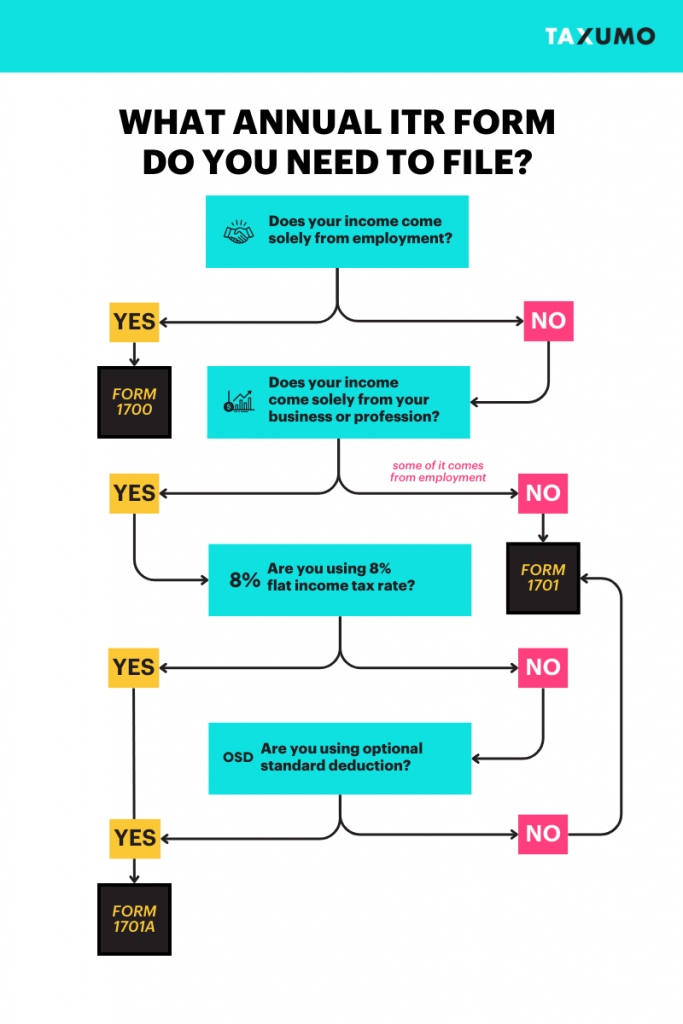
* Note: The Annual Income Tax Return (regardless of form) is just one of a series of quarterly tax forms you have to file. It is highly recommended that you also make sure you file your Quarterly Income Tax Forms aside from your Annual. You can read more about how to do so via Taxumo here.
I’m earning less than ₱250,000 annually
Under the new TRAIN law, those who earn less than ₱250,000 annually are exempt from paying income tax returns. So if you fall under this bracket, you don’t have to pay your annual ITR — BUT you still have to file.
My annual income is more than ₱250,000
The TRAIN law gives you two options for filing and computing your taxes. You can either follow the 3% percentage + income tax (use the graduated income tax table) or use the new 8% Gross Receipt Tax. Now, the 8% Gross Receipt Tax might sound easier for you, but keep in mind that it’s not for everyone. To know if you’re making the right choice, check out this tax calculator that we made for you. If you decide to use the 8% Flat tax rate, you can use the 1701A form in Taxumo.
How to compute your Annual Income Tax or ITR dues
Before you begin, you’ll need to check whether you’re on the 8% Income Tax Rate or the Graduated Income Tax Rate. The easiest way to do this is to check your Certificate of Registration from the BIR. This will indicate which tax schedule you’re on.
I’m on the 8% Income Tax Rate
- Income Solely from Business / Profession
Total Income Tax Due = 0.08 * (Gross Sales - ₱250,000)- Mixed Income Earner
Total Income Tax Due = (0.08 * Gross Sales) + Tax Due on CompensationAs you can see, the ₱250,000 deduction is NOT applied for Mixed-Income Earners. The reason for this is because the ₱250,000 has already been deducted from the tax due based on compensation so it no longer applies to the tax from your business.
I’m on the Graduated Income Tax Rate
If you’re on the Graduated Income Tax Rate, you’ll need to check first whether you’re on Itemized Deduction or Optional Standard Deduction (OSD). Here’s the difference between the two if you’re confused:
- OSD: This allows you to claim a deduction of 40% from your gross sales or receipts for the quarter.
- Itemized Deduction: You have to identify and deduct all the ordinary and necessary expenses from your gross income. These expenses must attribute to the development, management, and operation of your business like travel and salaries.
Take note that neither of these options is available for you if you opt for the 8% IT rate. Now, both of the deductions have different formulas for computing your taxable income so check your Certificate of Registration to confirm which one applies to you. With that being said, calculating your tax payable for Graduated Income Tax Rate takes two steps:
-
-
- Compute your taxable income.
- Based on the taxable income, refer to the tax table for how much tax you’ll need to pay.
-
Formulas for Taxable Income
- Itemized Deduction
Taxable Income = Gross Sales - Gross Purchases- Optional Standard Deduction
Taxable Income = Gross Sales * 60%
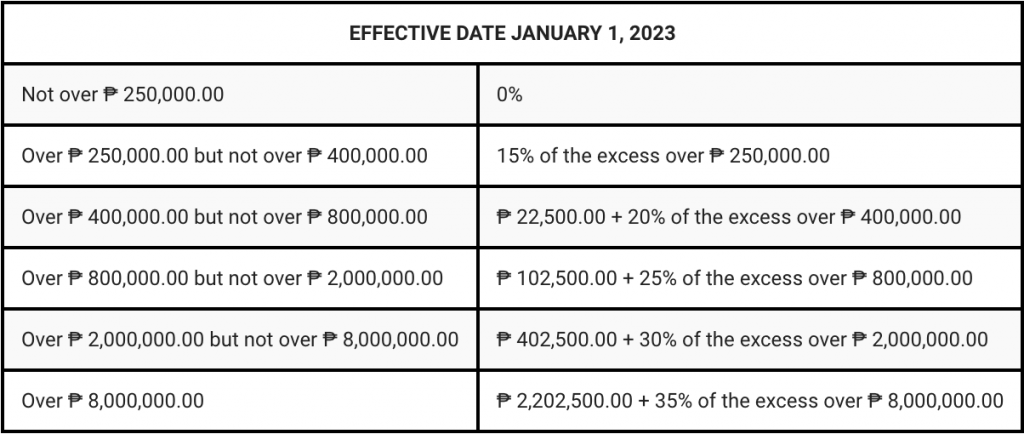
Computing for Tax Payable
After calculating your taxable income, you will need to refer to the tax table below for your tax dues.
Deadlines for filing BIR Form 1701, 1701A and 1700
We do recommend that you file your annual ITR as soon as possible to avoid any unforeseen problems.
What are the attachments required for filing ITR?
Here are the documents you’ll need to prepare:
-
- Certificate of Income Tax Withheld at Source (BIR Form 2307), if applicable.
- Certificate of Income Payments not Subjected to Withholding Tax (BIR Form 2304) if applicable.
- Duly approved Tax Debit Memo, if applicable.
- Previously filed return, if an amended return is filed for the same quarter.
Do I need to have a COR before I can use Taxumo?
Taxumo does not require you to upload your COR. This means you can already start filing even without your COR on hand.
When can I start using Taxumo for 1701 / 1701A / 1700 Forms?
1701A and 1701 forms are in the system already.
For 1700, you may email customercare@taxumo.com to request for this service. Kindly indicate 1700 Taxumo Service as the subject of your email.
https://www.youtube.com/watch?time_continue=9&v=x79N8zQlxcc&embeds_referring_euri=https%3A%2F%2Fwww.taxumo.com%2F&source_ve_path=MjM4NTE&feature=emb_title
How do I fill out the Fields in Taxumo for these forms?
Make sure that you have created an account in Taxumo. Uploading of the Certificate of Registration and the Signature is not necessary. What is necessary though is for you to have a subscription with Taxumo. Check out our plans and inclusions here: https://taxumo.com/pricing For those who are new to Taxumo, make sure the you encoded the income and expenses for Quarter 4 of last year. Don’t worry, the form will ask you for income and expenses prior to that, too, if you don’t want to encode each and every entry in Taxumo. If you have been a customer of Taxumo since the time you started your business, then you’ll have the details automatically shown in the Annual Income Tax form. If you just shifted or will shift to Taxumo, have your past Quarterly Income tax forms by by your side as you fill out the form.
Do I need to fill out the form in eBIR Forms?
If you use Taxumo, no need to fill out the forms in eBIR Forms. You will be able to access your BIR confirmation in your past filings tab. You will also be able to pay for your taxes using the different payment channels that we have provided. You can then access the copy of your payment record in your past filings tab. 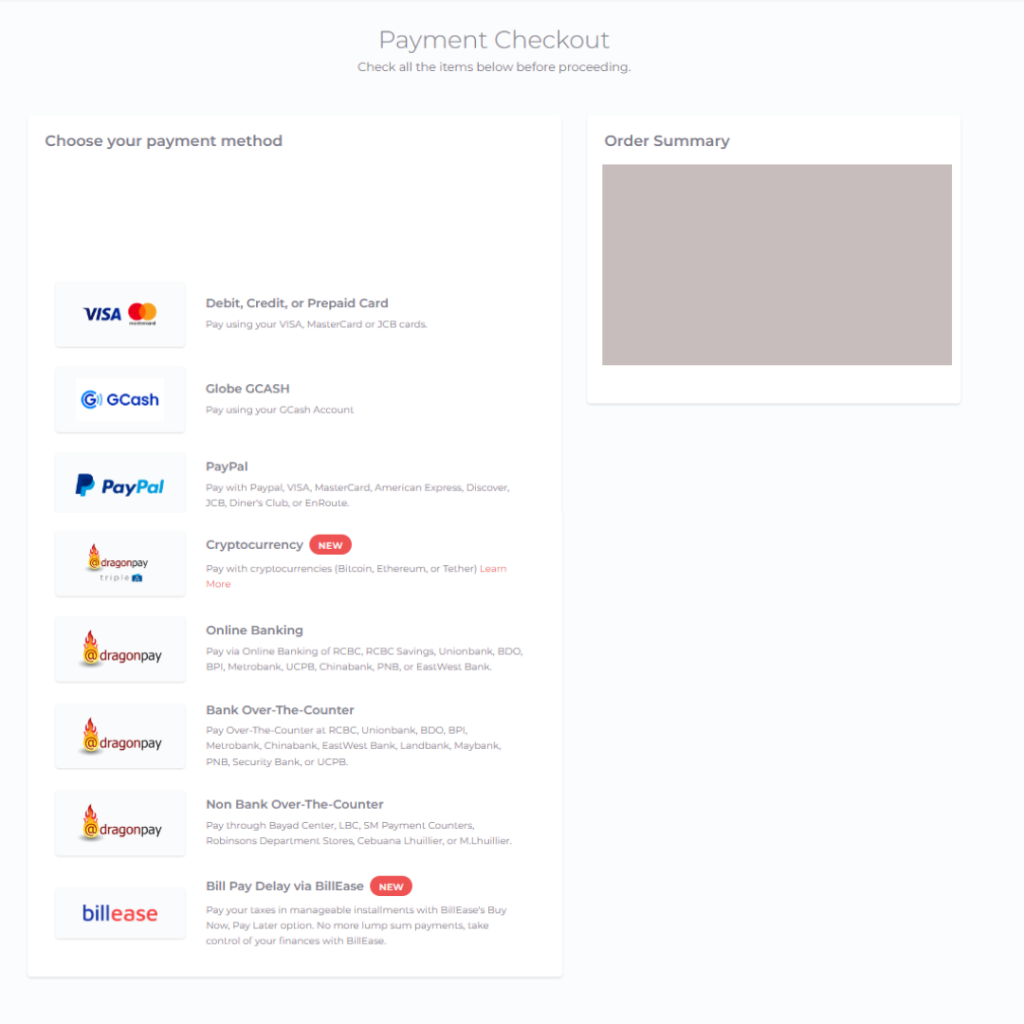 So again, these are the things that you can download and keep a copy of which you can get from your TAX DUES > PAST FILINGS Tab:
- Copy of your filled out tax form (1701A or 1701)
- Copy of your BIR Confirmation
- Copy of your payment record (if you had tax dues to pay for 1701A or 1701
Do I need to have the form stamped?
It is not required (if you are not submitting an Audited Financial Statement or AFS) along with your forms. However, if you really really want to have a “Stamped Form”, print out a copy of these forms:
- Copy of your filled out tax form (1701A or 1701)
- Copy of your BIR Confirmation
- Copy of your payment record (if you had tax dues to pay for 1701A or 1701
- Request for the SAWT confirmation (from Taxumo) via customercare@taxumo.com and print it out
- Collate all 2307 or Creditable withheld tax certificates that you have received
How much is Taxumo’s ITR Preparation service?
- For 1700: The service fee is Php2,000 (VAT-inclusive). This covers computation, filing, and remittance of your tax dues (if any). Get your quote and assistance in filing here.
- For 1701A and 1700: Preparation, filing and payment is included in all subscription plan.
When do I get a BIR Confirmation?
You will get a BIR Confirmation one week after the Taxumo filing deadlines. Read HERE for more information about the confirmation that you will receive. Note that for “peak seasons” for tax filing, the BIR may send us delayed confirmations, but rest assured that Taxumo will always help follow this up with them. We go the extra mile for our subscribers! Here are the Taxumo deadlines you have to take note of:
- 1701 and 1701A – Taxumo’s deadline is on April 11, 2024
- 1700 – Taxumo’s deadline for submission of requests and payments is on April 11, 2024
To be clear, you can still file AFTER these dates — penalty calculations of the BIR will be included though as Taxumo will assume the filing will happen after the April 15 deadline of the BIR.
When I use Taxumo for filing and paying for my 1701 and 1701A, when do I know that Taxumo has submitted or filed my form to the BIR?
After you have submitted your tax form via Taxumo, you will see the form’s progress in the “Past Filings” tab. This is where you will get the BIR Email Confirmation and the Payment record.
The status will be “Completed” within a week after the Taxumo deadline of filing. We highly encourage you to FILE EARLY.
If you have other questions about your Annual Income Tax, please do chat with us by pressing the chat button on the lower right side of this page.
Happy Filing!