

We know it must be hard to manually file for 2316 as an employer with employees. We understand the challenges that come with managing tax forms, especially when it involves Form 2316. But don’t worry! Taxumo is here to simplify the process for you.
Generate Form 2316 with just a few clicks
Step 1: Log in to Taxumo
Go to www.taxumo.com and sign in to your account.
Step 2: Set Up Your Business Account
Go to Tax Settings and set up your business details.
Step 3: Go to Attachments
Click on Attachments to generate 2316 records
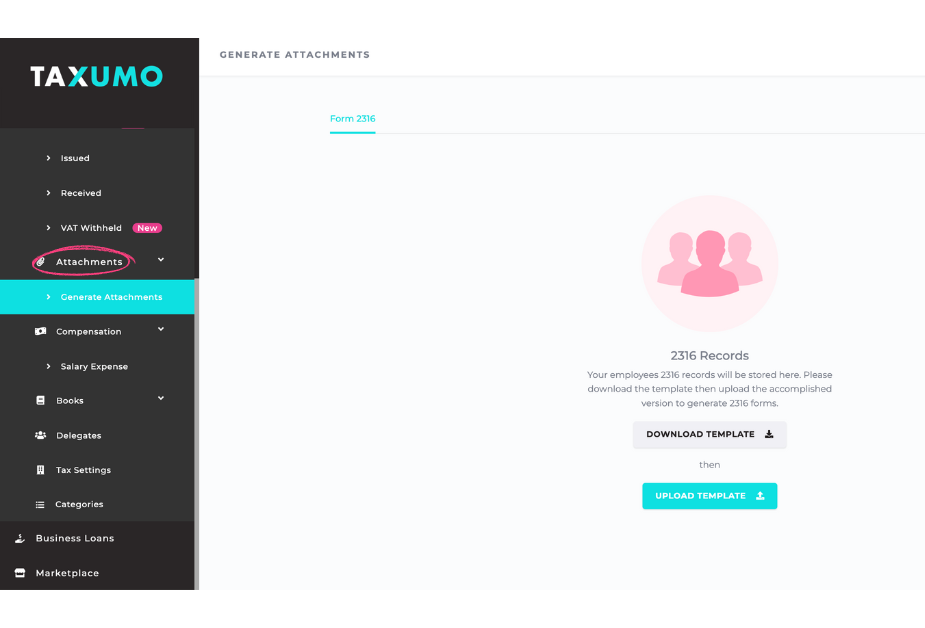
Step 4: Download the Excel Template
Just click to get the Excel template you’ll need for Form 2316.
Step 5: Fill Out the Template
Enter your information carefully in the Excel file. Make sure everything is accurate so your Form 2316 will be correct.
Step 6: Upload the Template
When you’re done, upload the filled-out Excel file back to Taxumo. Your data is safe and secure with us.
Step 7: Generate Your Form 2316
After checking that all info is correct, generate your Form 2316 with just a click.
Step 8: Review and Download
Take a final look to make sure everything is correct, then download your completed Form 2316 for your records.
Effortlessly Make Adjustments with Taxumo
In the event of inaccuracies, don’t panic. Taxumo empowers you to make adjustments effortlessly:
- Update the errors directly in the Excel template.
- Upload the fixed file back to Taxumo.
- Generate a new, updated Form 2316.
For any concerns regarding the details you need to add, or if there are any new details that need to be included, kindly email us at customercare@taxumo.com.